
Built by pharmacists, for patients

Scan the vial. We’ll handle the reminders.

Know exactly what you take, how much, and why. VialVue turns your prescription labels into one organized list and reminds you when each dose is due.

Coming soon to iPhone. For reference only, not medical advice.

How it works

Watch a real scan, start to finish

A real screen recording, shortened to under 30 seconds. Tap a step to jump to it.

From the ER to the pharmacy counter

VialVue was built by two brothers who are both pharmacists. Angelo works in an emergency room pharmacy, and Santino works in retail and compounding pharmacy.

When a patient arrives in the ER, the pharmacy team gathers their medication history. Most patients can’t tell us what they take, the dose, how often, or why. When that list comes up short, important medications for chronic conditions can go unordered during a hospital stay.

At the pharmacy counter, it looks different but starts the same way. Patients aren’t sure what they’re taking, and some ask to refill a medication they picked up a week earlier.

VialVue keeps every medication on your phone with the name, dose, directions, and what it’s for. You’ll have a complete list ready for any doctor, nurse, or pharmacist who asks, and you’ll know when a refill is actually due.

27–54%
of patients admitted to the hospital have at least one error in their medication history.1
  1. Tam VC, et al. Frequency, type and clinical importance of medication history errors at admission to hospital: a systematic review. CMAJ, 2005.
Angelo Ciavatta, PharmD, co-founder of VialVue
Angelo Ciavatta, PharmD Co-founder Emergency Medicine Pharmacist
Santino Ciavatta, PharmD, co-founder of VialVue
Santino Ciavatta, PharmD Co-founder Retail & Compounding Pharmacist

“Behind every prescription is a person trying to stay healthy. We’ve watched patients and loved ones struggle to keep up with their medications, and we knew there had to be a better way. With our pharmacy expertise, we built VialVue to make medication management simple, accessible, and stress-free.”
VialVue
Daily compliancefills as you take each dose
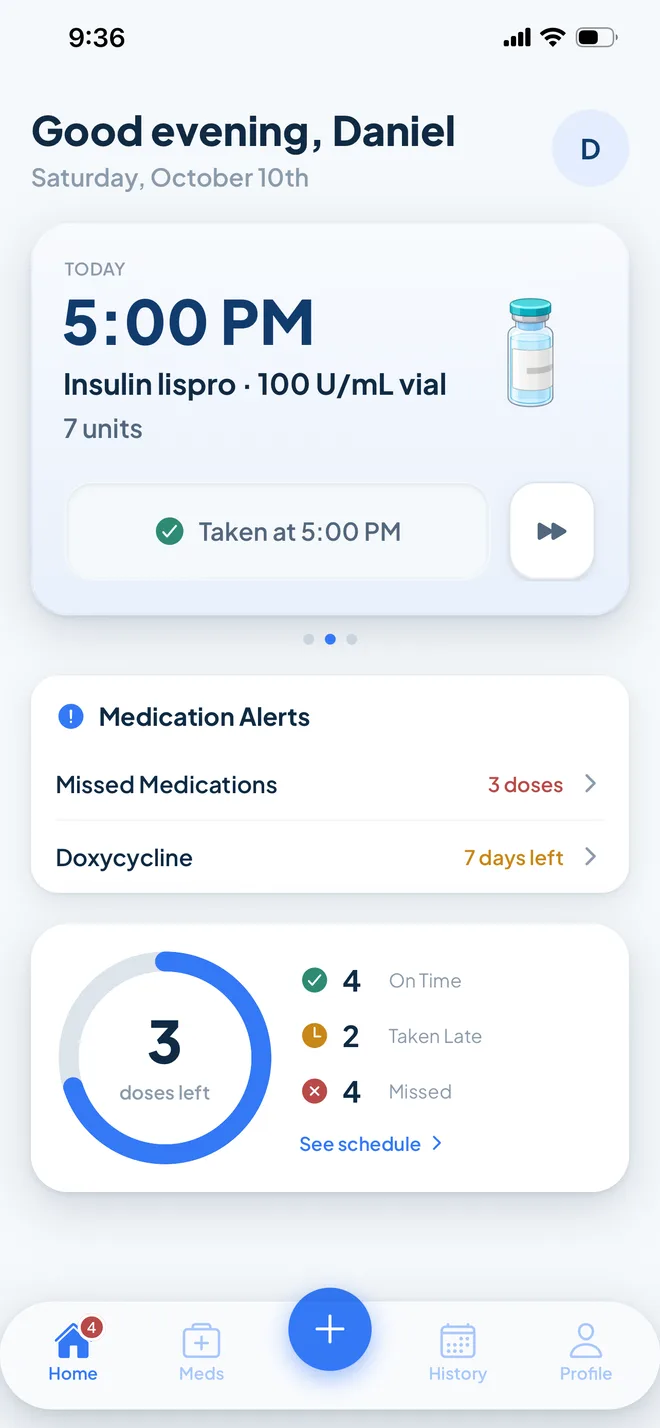
Home screen showing today’s 5:00 PM insulin dose marked taken, and a progress ring with 3 doses left plus on time, taken late, and missed counts

Know what to do, right now

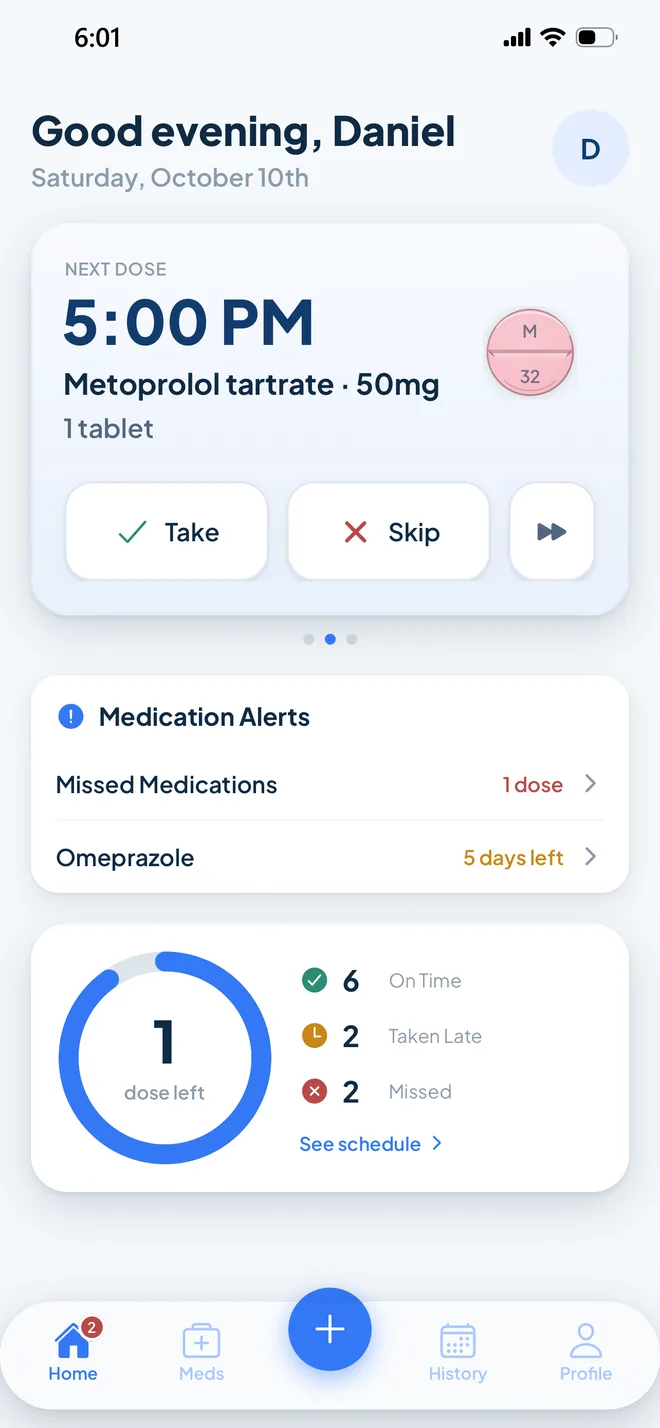
Your next dose sits at the top of the home screen, one tap from marked taken. Medication alerts flag anything that needs your attention, like a missed dose or a medication running low. Below them, a ring fills as the day goes and counts down the doses you have left.

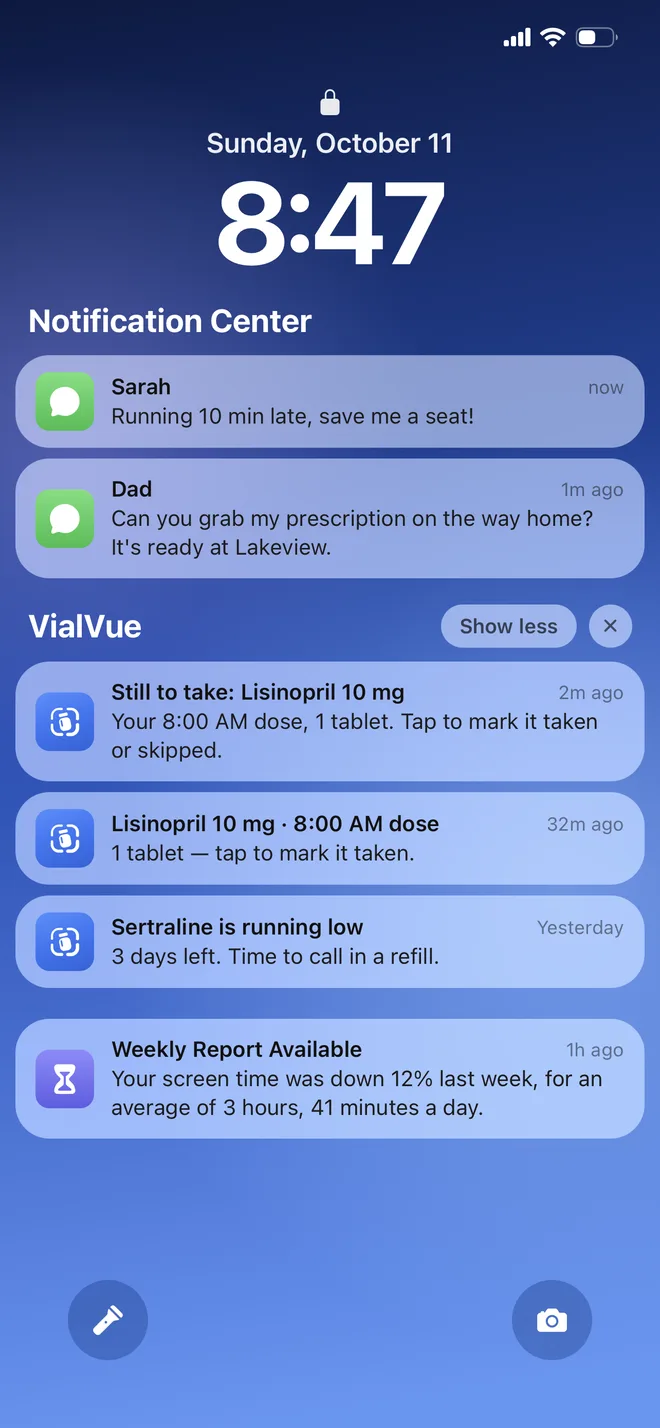
iPhone lock screen with VialVue notifications: an 8:00 AM Lisinopril reminder, a follow-up half an hour later, and an alert that Sertraline is running low

A nudge only when a dose slips by

If a dose isn’t marked taken 15 minutes after it’s due, VialVue sends a reminder, and one follow-up half an hour later if it’s still open. Tap it to mark the dose taken, or snooze it for 15 minutes. When a medication is running low, you’ll hear about that too.

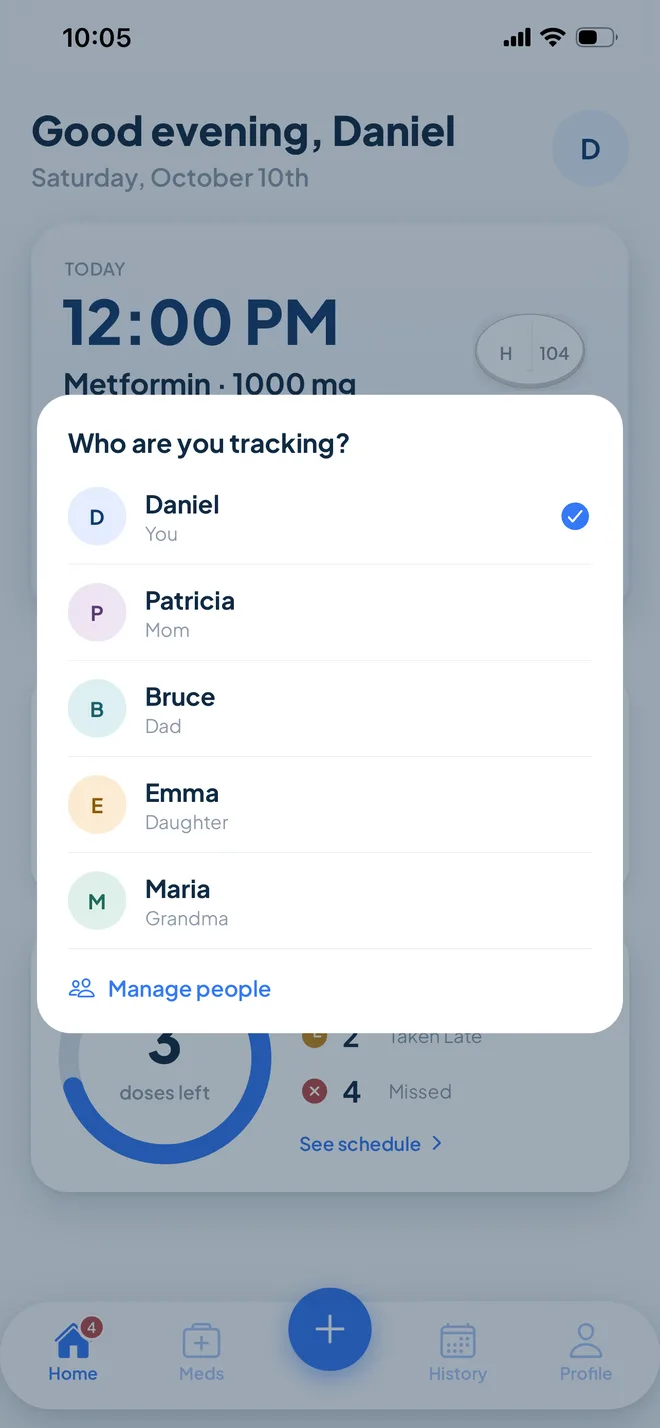
Who are you tracking sheet listing Daniel, Patricia, Bruce, Emma, and Maria

Keep track for the people you look after

Add a parent, partner, or child, and each person gets their own medication list and allergies. Reminders say whose dose it is. Choose who a medication is for when you scan it, and switch between people from the home screen.

Latanoprost 0.005%Glaucoma
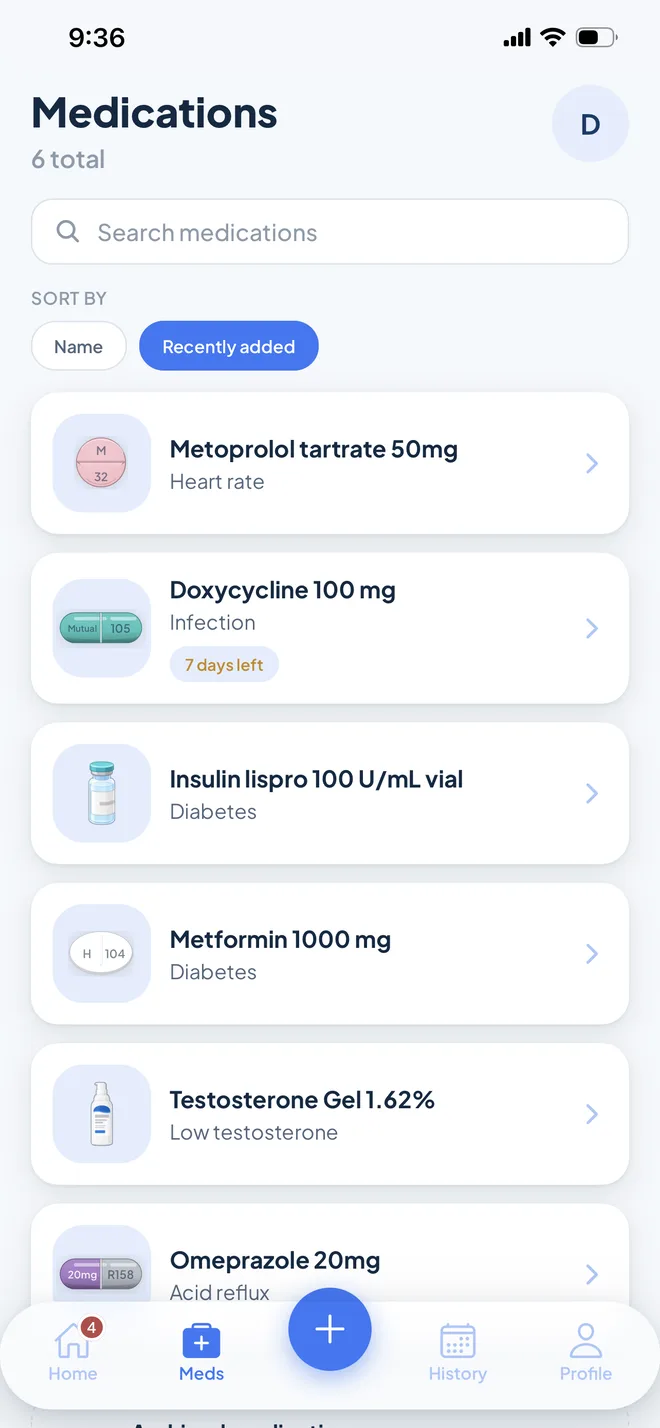
Medications list with six medications, each with a picture of the pill and what it’s for

Recognize every medication at a glance

Tablets, capsules, eye drops, inhalers, and more each get an icon showing the shape, color, and imprint described on your label, along with what it’s for. So you can be confident you’re taking the right medication at every dose.

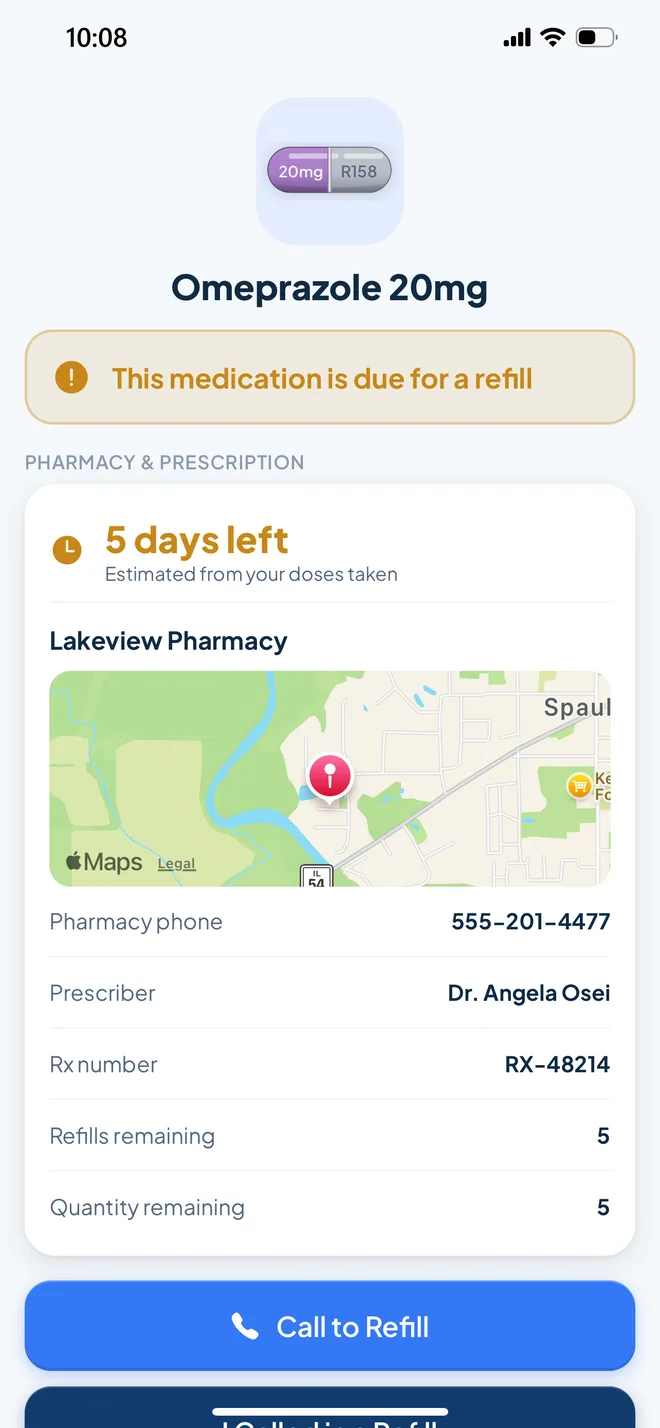
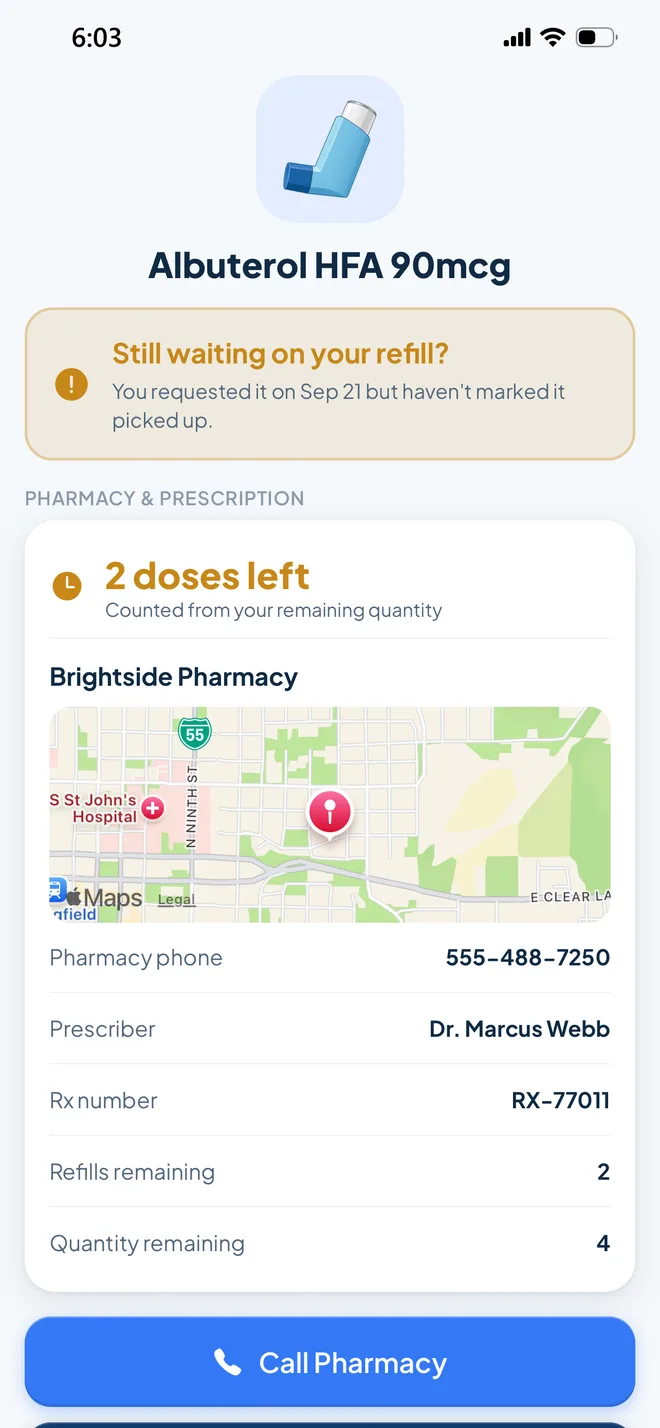
Medication Review screen for Omeprazole 20mg showing it is due for a refill with 5 days left, plus the pharmacy, a map, phone number, prescriber, Rx number, refills remaining, and a Call to Refill button

Never run out without knowing

VialVue estimates how much you have left from the label and the doses you log. When a medication runs low, it tells you what to do next, whether that’s calling in a refill or asking your prescriber for a renewal, and keeps reminding you until it’s sorted.

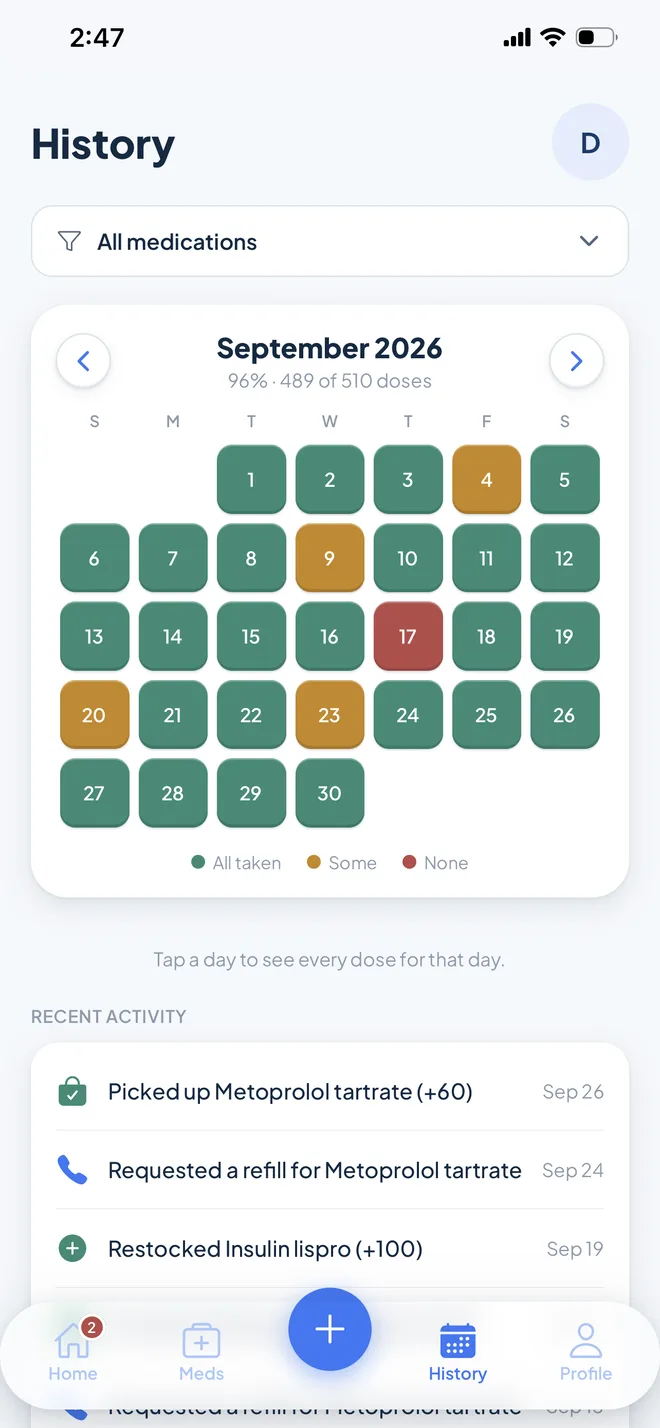
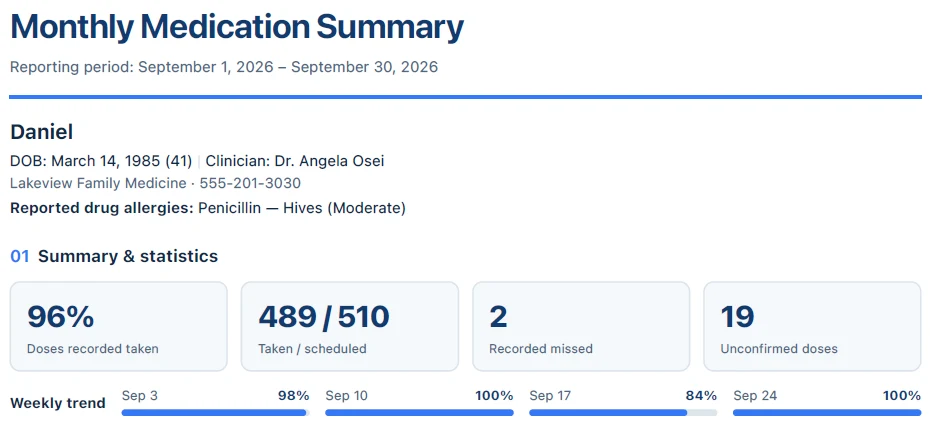
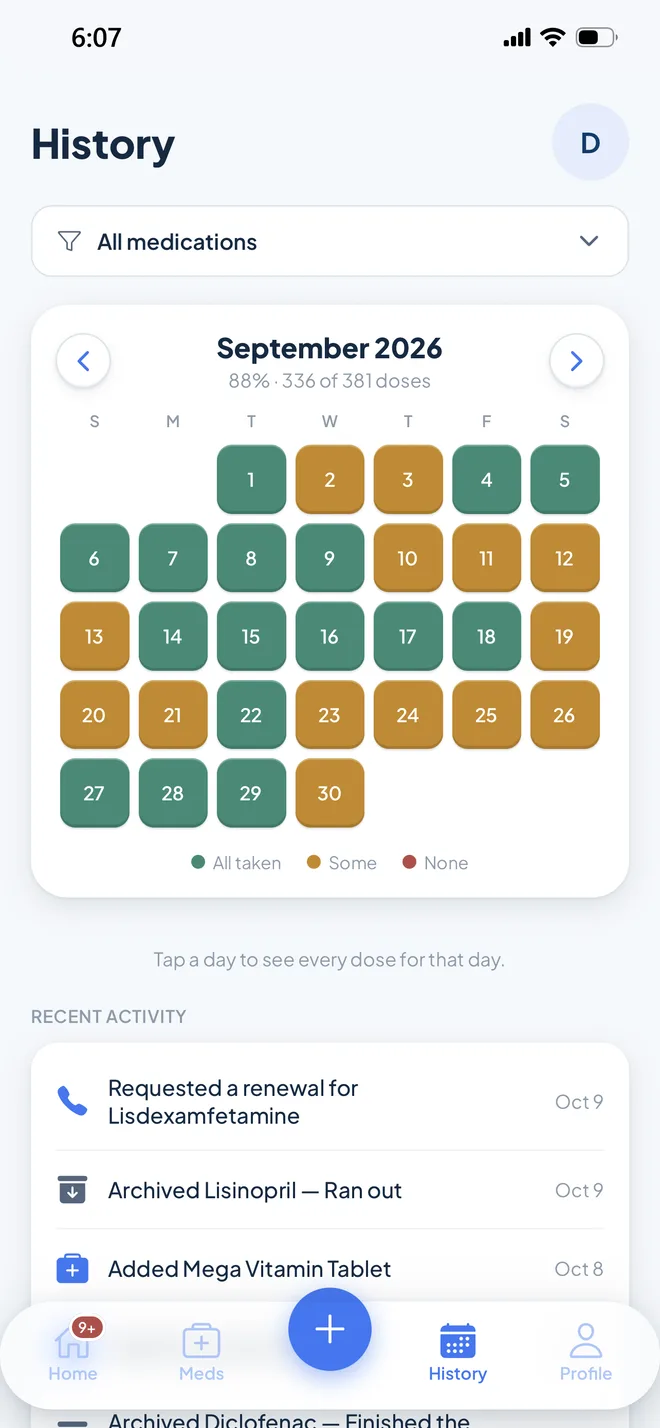
History screen with a color-coded September calendar showing 96% of doses taken, and recent refill and pickup activity
Top of a Monthly Medication Summary PDF with the patient details, allergies, adherence statistics, and weekly trend

See your progress and every change

The History tab color-codes every day of the month by how it went, and tapping a day shows each dose. Refills, pickups, and restocks land in a running log. Before an appointment, export a monthly PDF with your adherence, current medications, and allergies to print or send.

What happens to your information

The short version. The Privacy Policy has the details.

Your health information is protected and belongs to you. Your medication record is stored so that only your account can access it. Photos you scan are used for one thing, reading the label, and are then deleted.

No ads, and your data is never for sale. We never sell or share your information for marketing.

You’re in control. Delete your account from inside the app, and your profiles, medications, and dose history go with it.

Support for your care, not a replacement. VialVue helps you follow your prescriber’s directions. It doesn’t replace advice from your doctor, pharmacist, or other healthcare provider. See the Medical Disclaimer.

Common questions

How much does VialVue cost?

Downloading VialVue and setting it up is free, including scanning your first medication. After that, a subscription is required: $4.99 a month, or $39.99 a year, which works out to a third less than paying monthly.

How do I cancel my subscription?

Anytime, from your Apple ID settings: open Settings, tap your name, then Subscriptions. Your subscription renews automatically unless you cancel at least 24 hours before the current period ends, and you keep access until the end of the period you’ve paid for. If it ends, your medication list stays in your account for you to view, and everything else picks up again when you resubscribe. The Terms of Service have the details.

Which phones does it work on?

VialVue is coming to iPhone first, on the App Store. An Android version for Google Play will follow.

How does scanning a vial work?

Tap the + button and choose Start Scan. Prescription labels wrap around the vial, so take a few photos as you slowly turn it until the whole label has been captured. VialVue reads the label and fills in the details for you. You can also add a medication by hand.

Can I scan a pharmacy printout instead?

Yes. Switch the scanner to Document and fit the page in the frame. VialVue reads the leaflet or after-visit summary that came with your prescription, or a photo you already took.

How accurate is the scan?

It reads clear labels well, but AI can still misread a dose, strength, or frequency, especially on curved, worn, or shiny labels. That’s why VialVue shows you everything it found and saves nothing until you’ve checked it. You can edit any medication later from the Meds tab.

When will I get reminders?

If a dose hasn’t been logged 15 minutes after it’s due, VialVue sends you a notification, and one follow-up half an hour later if it’s still open. You can snooze a reminder right from the notification, turn off the follow-up, or switch medication reminders off entirely in your Profile. Make sure notifications for VialVue are allowed in your iPhone Settings.

How do refill reminders work?

When you scan a label, VialVue saves details like the quantity, refills remaining, and the pharmacy that filled it. As you log doses, it estimates how many days you have left and lets you know when you’re running low. When it’s time to refill, tap to call your pharmacy straight from the app.

Can I manage medications for someone else?

Yes. Go to Profile → People you care for to add family members. When you scan or add a medication, choose who it’s for.

Can I share my history with my doctor?

Yes. From the History tab, tap Export as PDF for a monthly summary with your adherence, your current medication list, and what changed. It’s easy to print or send before an appointment.

Is VialVue medical advice?

No. VialVue helps you organize and remember the medications you’ve already been prescribed. Always follow the directions on your label and ask your care team if you have questions.

How do I get help?

Email us at [email protected] or visit the Support page.

Your next dose, already on the schedule.

VialVue is coming soon to iPhone. Send us a quick email and we’ll let you know the day it’s on the App Store.

Email me at launch